Online Business Card vs Digital Business Card vs Virtual Business Card: which one do you actually need?
By Business Cards Online Editorial Team | Published | Updated | Guides
Online, digital and virtual business cards are often used interchangeably, but they solve slightly different problems. Here's how to tell them apart and pick the right one.
What is the difference between an online, digital and virtual business card?
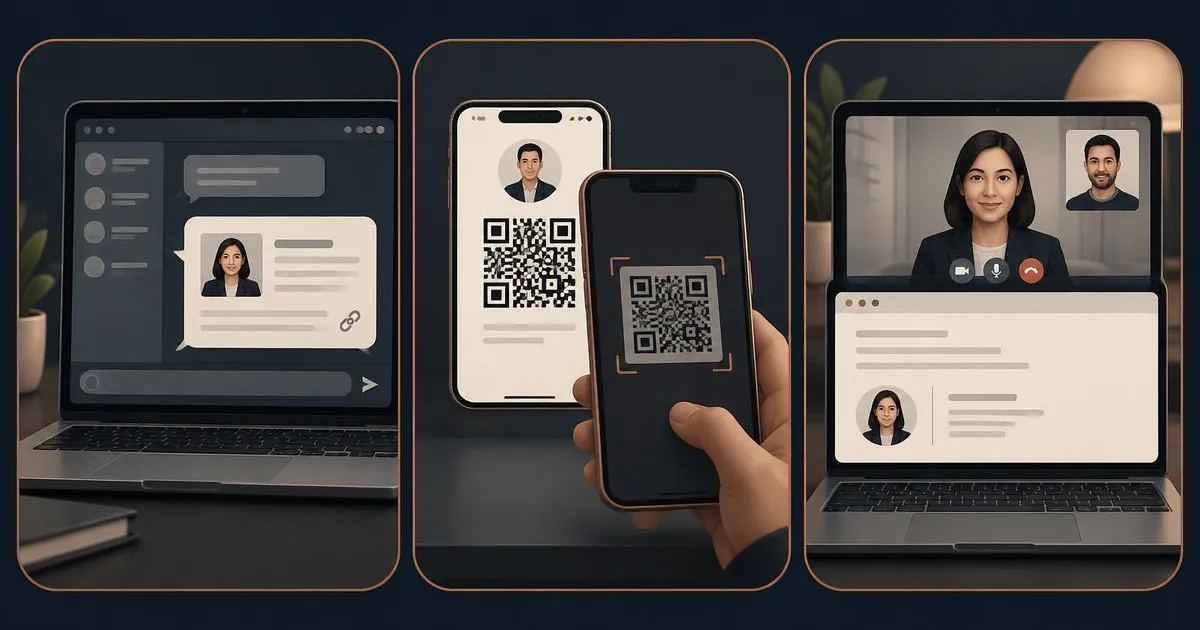
In short: an online business card is a web page you can share via a link or QR code; a digital business card usually refers to the same live profile shared in person, by showing a QR code on your phone or sending a link; and a virtual business card typically means a downloadable contact file (like a vCard) that saves directly into someone's phone contacts. In practice, most modern providers blend all three into one product, but understanding the distinction helps you choose the right features for your business.
All three exist to replace or supplement paper business cards, letting you share up-to-date contact details, links and branding without printing costs or running out of stock. The right choice depends on how you network, and whether you mostly meet people in person, remotely or on screen.
The Evolution of Professional Networking in the UK
Networking in the UK has undergone a significant shift. A decade ago, a meeting at a London trade show or a Manchester networking event was incomplete without the ritual exchange of thick cardstock. Today, that ritual is becoming digital. However, the shift isn't just about replacing paper; it's about the speed and accuracy of information transfer. When you use an online or digital solution, you eliminate the manual entry of data—no more stacks of cards on your desk waiting to be typed into a CRM. Instead, the connection is immediate, digital, and actionable.
What is an online business card best for?
An online business card is essentially a personal or company web profile hosted at a link (for example, yourname.example.com or a QR code linking to it). It's best for people who want a shareable, always-up-to-date profile that works everywhere — in an email signature, on social media, on a website, or as a QR code on packaging or a poster.
- No app required for the person viewing it — it opens like any web page.
- Easy to update pricing, services, socials and photos any time.
- Works well for freelancers, consultants and small teams who want one link to share everywhere.
If this sounds like what you need, a good online business card service will let you build and edit your profile without any coding or design skills.
What is a digital business card best for?
A digital business card is best for face-to-face networking, because the other person simply scans the QR code on your phone screen with their camera — no app and no typing. It's the natural digital replacement for a stack of paper cards you hand out at conferences, meetings or trade shows.
- Share by QR code from your phone, or by link in a message.
- Ideal for sales teams, estate agents, recruiters and anyone attending events regularly.
- Often includes analytics so you can see how many times your card has been scanned or viewed.
Businesses that network in person a lot tend to get the most value from a digital business card, especially when the whole team uses matching profiles with consistent branding.
What is a virtual business card best for?
A virtual business card is best when the priority is getting your details saved straight into someone's phone contacts, rather than just viewed. This is usually provided as a vCard (.vcf) file or a "save contact" button, and it's especially useful for remote-first businesses, customer service teams, or anyone who mostly connects with people online rather than in person.
- A "Save contact" button adds your name, number, email and company straight to their address book.
- Great for remote teams, video calls, and email-based introductions.
- Often combined with a link-in-bio style profile for social media.
If most of your introductions happen over email or video call rather than in person, a virtual business card is usually the simplest fit.
Industry-Specific Use Cases
Different sectors benefit from different features of these digital tools:
- Real Estate Agents: Use virtual cards to ensure clients have their number saved instantly, avoiding the "who is this calling me?" moment later.
- Hospitality & Events: A QR code on a phone screen lets event staff share details quickly without fumbling for paper.
- Creative Freelancers: Online business cards act as a mini-portfolio, showcasing recent work and social media links directly to potential clients.
- Corporate Sales: Centralised team management for digital cards ensures every representative has the correct, brand-approved information.
Online vs digital vs virtual business card: comparison table
| Type | How it's shared | Best for | Needs hardware? |
|---|---|---|---|
| Online business card | Link or QR code to a web profile | Freelancers, consultants, one link for everything | No |
| Digital business card | QR code on your phone, or a link | In-person networking, events, sales teams | No |
| Virtual business card | Downloadable vCard / save-contact button | Remote teams, email and video introductions | No |
The Cost and Environmental Impact
Paper business cards are often thrown away within days, and every change of role or number means a reprint. A single digital profile replaces every reprint: when your details change you edit the page instead of ordering a new box. That removes recurring printing costs and the paper waste that comes with them.
Security and Privacy Considerations
Handing over a paper card often means giving away personal information that stays on a piece of paper forever. With digital solutions, you have more control. Many platforms allow you to password-protect certain sections of your card or use "lead capture" modes where you only share your details once the other person has shared theirs. Furthermore, leading providers are GDPR-compliant, ensuring that the data you collect is handled according to UK law.
Can one product do all three?
Yes — in fact, most people don't need to pick just one. A well-built profile can be shared as a link (online), scanned in person (digital), and saved as a contact from an email signature (virtual) — all from the same page. The terminology matters less than making sure whichever provider you choose covers the way you actually network day to day.
Whichever you choose, we'd always recommend starting from how you network rather than the label on the tin. If you mostly meet people face to face, start with a digital business card; if you share a link everywhere, start with an online business card; and if you need people to save your details instantly, a virtual business card will serve you best.
How do I choose between providers?
When comparing providers, look for:
- Editability — can you update your details after you have shared the card?
- Compatibility — does it work on both iPhone and Android without an app?
- Analytics — can you see scans, views and link clicks?
- Team management — can an admin update everyone's card from one dashboard?
- Design control — can you match your brand colours and logo?
Business Cards Online is an independent digital business card storefront powered by the Let’s Connect platform: you buy here, and your profile runs on the Let’s Connect platform. If you're still not sure which type fits your business, get in touch and we'll point you in the right direction, or read more about Business Cards Online.
Frequently asked questions
Do I need an internet connection to share my card?
For an online or digital business card, the person viewing it will need an internet connection to load the profile web page. The QR code itself can be scanned without a connection, but the profile needs one to load. Virtual business cards (vCards) can often be saved and viewed offline once downloaded.
Can I use my own custom domain name?
Many premium providers allow you to map your digital card to a custom domain (e.g., hello.yourname.co.uk). This is excellent for branding and trust, though it might require a slightly more advanced setup and a higher tier of service.
Are these cards compatible with Apple Wallet and Google Pay?
Yes, most modern online and virtual business card providers allow you to add a shortcut to your card directly into your phone's digital wallet. This makes sharing your QR code even faster without needing to open a specific app or browser tab.
What happens if I lose my phone?
Nothing is lost. Your profile lives online, so you sign in from any device and keep sharing the same link and QR code.
Is there a monthly fee for these services?
It varies by provider. Some offer a one-off payment, while others charge a monthly or annual subscription for advanced features like team management, detailed analytics, and CRM integrations. We compare these pricing models on our about page.
Can I have multiple versions of my card for different roles?
Absolutely. Many professionals have one version for their primary job and another for a side project or personal networking. Good providers allow you to manage multiple profiles from a single account, switching between them as needed.
Quick answer summary
- Online business card = a shareable link/web profile.
- Digital business card = shared in person by QR scan or link.
- Virtual business card = a downloadable contact file (vCard).
- Most providers combine all three — choose based on how you network, not the label.
Related guides
For the full set-up process, read our step-by-step guide to creating an online business card. If you are deciding whether you also need a website, see online business card vs personal website.